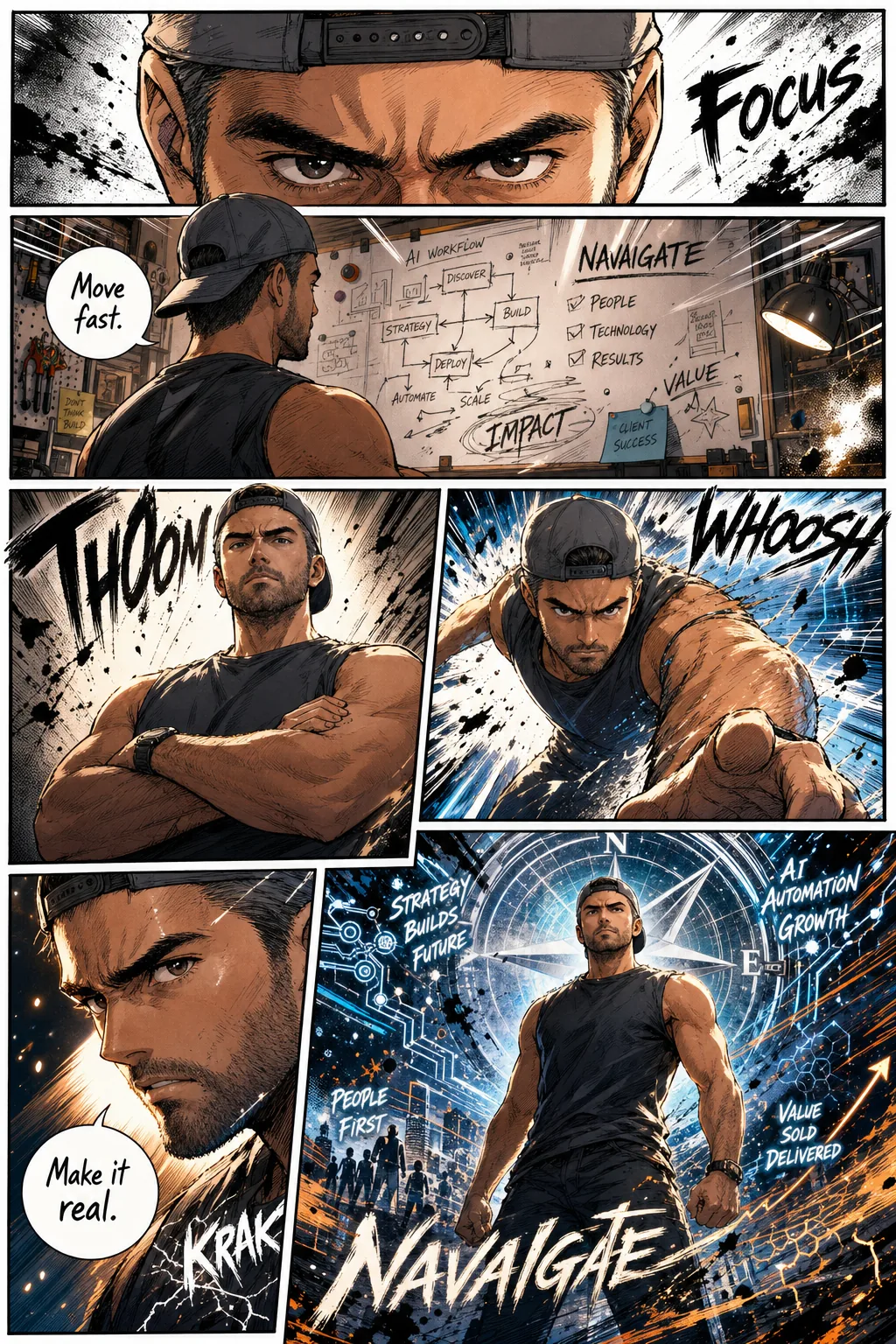
We turned our founder into a manga hero. Six panels, full colour, sound effects, speech bubbles, the lot. And we did it with a single prompt pasted into ChatGPT.
Here's the exact prompt. Take it.
The prompt (copy this)
Create a high-quality full-page color manga artwork inspired by the person in the reference photo. Use a true manga/comic page layout with 5–7 interconnected panels across a single page. Build the page with cinematic visual storytelling, dramatic camera angles, expressive facial emotions, dynamic body language, close-ups, action shots, speed lines, and strong panel-to-panel flow.

Include English manga-style sound effects, handwritten speech bubbles, halftone shading, ink splashes, sketchy comic linework, impact frames, and graffiti-like brush accents. Combine vivid color treatment with manga rendering, bold contrast, and stylized shading. Highlight the character's presence, personality, and aura through symbolic motifs, atmospheric energy, and emotional intensity.

The page should feel immersive, stylish, and energetic, with a professional manga aesthetic, a hand-drawn look, fluid composition, and a balance of clean white negative space with chaotic ink textures. Highly detailed, expressive, polished, and visually powerful. Aspect ratio 3:4 HD.
That's it. No plugins, no specialist software, no design experience required. Upload a clear photo of yourself, paste the prompt, set the aspect ratio to 3:4, and wait about thirty seconds.
The result above is ours: six panels, dramatic angles, THOOM and KRAK sound effects, a whiteboard showing our AI workflow, and a compass logo in the final hero shot. Every element came from the model reading a single reference photo and the prompt above, nothing was edited or composited afterwards.
How to do it yourself
1. Get a clear reference photo.
A well-lit headshot or upper-body shot works best. The model reads your face, build, clothing and general vibe to construct the character. A blurry or heavily filtered photo will produce a weaker likeness. Natural light, straight-on or slight angle, that's all you need.
2. Open ChatGPT and attach the photo.
Use ChatGPT (the GPT Image feature is available on the Plus and Pro tiers). Start a new conversation, attach your photo, then paste the prompt above into the message box. Do not add extra instructions in the same message, the prompt is already comprehensive; competing instructions dilute it.
3. Set the aspect ratio to 3:4.
The prompt specifies 3:4 HD but you can also select it explicitly in the image generation options if your interface exposes that control. The tall portrait format is what gives the result its proper manga-page feel, a square or landscape crop will break the panel layout.
4. Iterate.
Your first result is rarely your last. If the likeness is off, try a different photo. If the panel composition feels cramped, ask the model to "redistribute the panels with more breathing room." If you want a specific mood, darker, more chaotic, more heroic, add a single adjective to the opening line of the prompt and regenerate.
Prefer the terminal? Do it in Codex
As of OpenAI's April 2026 update, Codex has a built-in image_gen tool and runs the same gpt-image-2 model, so if you live in the terminal, you do not need to open a browser at all.
Enable image generation with a single command:
codex features enable image_generationOr set it permanently in your Codex config:
[features]
image_generation = true
The default route uses your ChatGPT subscription, no API key required. If you want finer controls (transparent background, custom size, masking), point Codex at the API instead by setting OPENAI_API_KEY in your environment.
The workflow is identical to the ChatGPT steps above: attach or point Codex at your reference photo, paste the same prompt, and specify 3:4. The output is the same model, the same quality, just without leaving your terminal.
Three ways to get a better result
Use a photo that shows your actual energy
The model is good at reading body language. A photo where you look straight down the lens with a direct expression will produce a very different character to one where you're mid-laugh or looking away. Neither is wrong, they produce different characters. Choose deliberately.
Rewrite the speech bubbles
The model will invent dialogue for your character. Sometimes it's surprisingly apt; sometimes it's generic. If you want specific lines, your actual tagline, a phrase you use in pitches, something that means something, add them to the prompt: "Speech bubbles should read: [your line 1] and [your line 2]." Keep them short: three to five words per bubble reads like proper manga, ten words reads like a terms-and-conditions notice.
Swap the symbolic motifs
The prompt asks the model to "highlight the character's presence and aura through symbolic motifs." By default it will invent something. You can steer it: add a line like "Symbolic motifs should include a compass, a blueprint, and circuit-board lines" and those elements will appear in the background panels. This is the easiest way to make the result feel specific to your work or brand rather than generically heroic.
What this actually demonstrates
This is a fun experiment. But it points at something real.
The prompt above works because it is precise without being rigid. It specifies structure (5–7 panels, 3:4 aspect), style (halftone, ink splashes, speed lines), emotional register (dramatic, energetic, immersive), and technical quality (HD, polished), all in one block of text. The model has everything it needs to make good decisions, and nothing is left to chance.
That structure is the same discipline that makes prompts work in less playful contexts: writing a client brief, generating a risk summary, drafting a product spec. The difference between a prompt that produces something useful and one that produces noise is almost always specificity and structure, not technical knowledge about the model.
Prompt craft is a learnable skill. It is not reserved for developers or data scientists. Our founder spent more time deciding what to put on the whiteboard in his manga panels than he did writing the prompt, because the prompt was already done.
That is what NavAIgate works on with the organisations we support: not the fun party trick (though those have their place), but the underlying craft of communicating clearly with AI so it produces output you can actually use. If that is useful to your team, you will find us at navaigate.dev.
Work with us
Prompt craft your team can actually use.
The party trick is the easy part. We help organisations build the underlying craft of communicating clearly with AI so it produces output you can rely on.